Contact Us
Contact our corporate or local offices directly.
Parent page: Accessing, Defining & Managing System Preferences
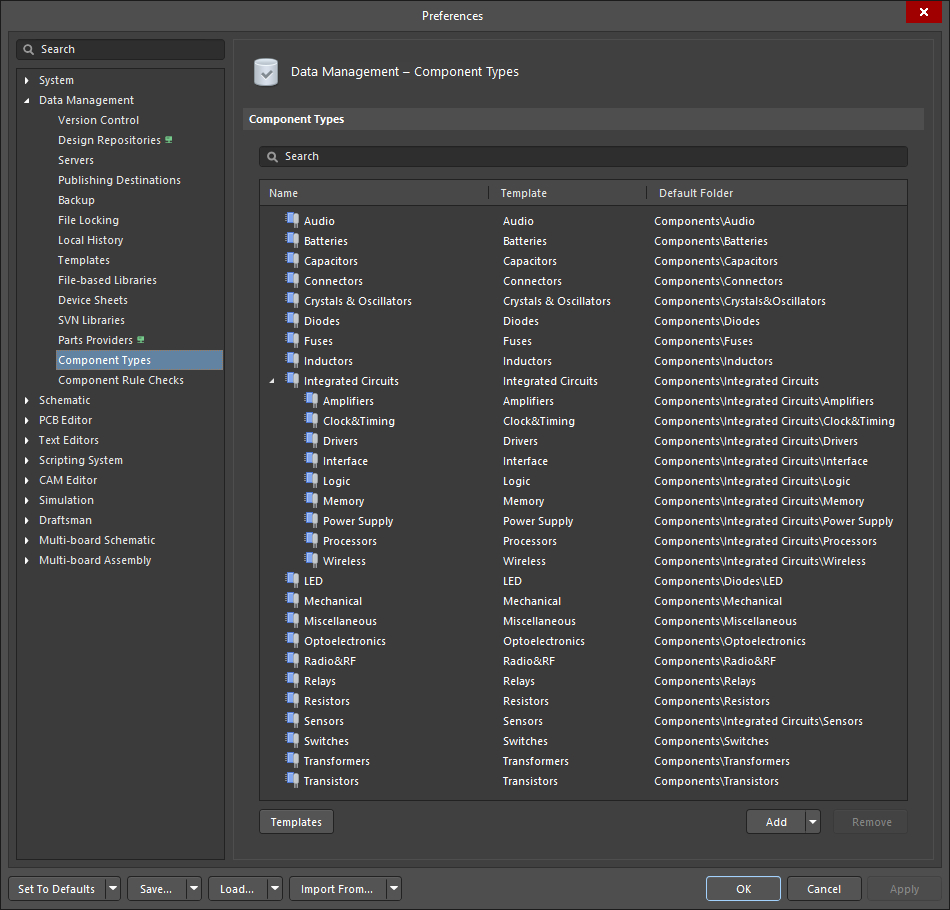
The Data Management – Component Types page of the Preferences dialog.
The Data Management – Component Types page of the Preferences dialog provides controls to manage Component Types of the currently active connected Workspace.
The Data Management – Component Types page is part of the main Preferences dialog, and it can be accessed by:
 control in the upper-right corner of the design space then selecting the Component Types entry under the Data Management folder.
 button in the Choose component type dialog. button at the right of the Type field under the Advanced Settings options.
Template – lists the name(s) of each Component Type template, which will mirror the Component Type itself, or appear as a list of all the Component Types that have been merged if a merge has taken place.
Templates – click to open the Edit template dialog to update and group existing components for changed templates.
Add – click to add a new Component Type in the list, which will be added with the default name New Type. Enter the new type name in the highlighted text box. The named type is automatically repositioned in the alphabetically ordered list. Use the drop-down to access these additional options:
Move
Contact our corporate or local offices directly.